Since Microsoft published IE8 as a Windows Update and my boss said he upgraded to it, I figured it was safe to upgrade to it as well. I’ve been enjoying the changes for a couple days now, but when I attempted to debug an ASP.NET application with Visual Studio 2005, it would no longer stop at a breakpoint. Pretty frustrating if you ask me. I’ve found a few articles online describing problems, most of which I haven’t encountered yet. You may want to implement all these workarounds.
The problem I was having appears to be related to how IE8 uses multiple processes. Apparently VS 2005 doesn’t know which process to attach to. Here are three solutions:
1.Don’t have IE8 running at the time you want to debug. This worked for me.
2.Modify the registry as described in the second link above. This worked for me as well. Here are the steps:
1.Open RegEdit
2.Browse to HKEY_LOCAL_MACHINE -> SOFTWARE -> Microsoft -> Internet Explorer -> Main
3.Add a DWORD value called TabProcGrowth with a value of 0
4.Turn off protected mode browsing in IE (Security page of Internet Options) if you are running on Vista or newer.
3.Uninstall IE8 to revert back to IE7. I don’t really want to do this though. I’ve grown particularly fond of a few of the new features in IE8, such as previous session restore (although I wish it would allow me to restore more than just the last session) and improvements in search.
I don’t know if this is a problem with VS 2008, but some of the articles seem to imply it only applies to VS 2005. Maybe it’s time to upgrade Visual Studio
Referencing 2.0 Web Services (asmx) in Visual Studio 2008
Recently I needed to add a reference to a classic (.Net 2.0) web service inside a new project that was being created via Visual Studio 2008.
Now, I have not done a lot of work with WebServices in the past 6-9 months, but thought it would be cake. Please keep in mind, the service I wanted to connect to was NOT a WCF Service, it was a standard ASMX service.
Below is what I thought would work, but did not
1- Attempt to Add A Service Reference

2- Choose Services in Solution (my Project is in the same solution file).

3- View the generated service implementation.


 4- Finally need to search for and find your web service
5- Lastly, if you have done everything correctly, you should see the following.
Now I know that the preferred service type is now WCF, but come-on not everyone is using WCF just yet. Adding a traditional web service reference is way too much friction. Why is not possible to add a reference from the solution explorer? Really can anyone answer me that.
Till next time,

Now, I have not done a lot of work with WebServices in the past 6-9 months, but thought it would be cake. Please keep in mind, the service I wanted to connect to was NOT a WCF Service, it was a standard ASMX service.
Below is what I thought would work, but did not
1- Attempt to Add A Service Reference

2- Choose Services in Solution (my Project is in the same solution file).


3- View the generated service implementation.

4- WCF Style code implementation

What you will notice from step 4 is that the way you go about implementing this service is in the WCF style. This is not what I was looking for. I was wanting to reference this like all the other code in our projects.
Below is what DID work
2- Attempt to Add A Service Reference
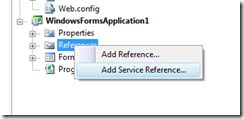
3-Need to add the service as a Web Reference
 4- Finally need to search for and find your web service
 5- Lastly, if you have done everything correctly, you should see the following.

Now I know that the preferred service type is now WCF, but come-on not everyone is using WCF just yet. Adding a traditional web service reference is way too much friction. Why is not possible to add a reference from the solution explorer? Really can anyone answer me that.
Till next time,
Date/Time Conversions Using SQL Server
Problem
There are many instances when dates and times don't show up at your doorstep in the format you'd like it to be, nor does the output of a query fit the needs of the people viewing it. One option is to format the data in the application itself. Another option is to use the built-in functions SQL Server provides to format the date string for you.
Solution
SQL Server provides a number of options you can use to format a date/time string. One of the first considerations is the actual date/time needed. The most common is the current date/time using getdate(). This provides the current date and time according to the server providing the date and time. If a universal date/time is needed, then getutcdate() should be used. To change the format of the date, you convert the requested date to a string and specify the format number corresponding to the format needed. Below is a list of formats and an example of the output:
DATE FORMATS
Format # Query (current date: 12/30/2006) Sample
1 select convert(varchar, getdate(), 1) 12/30/06
2 select convert(varchar, getdate(), 2) 06.12.30
3 select convert(varchar, getdate(), 3) 30/12/06
4 select convert(varchar, getdate(), 4) 30.12.06
5 select convert(varchar, getdate(), 5) 30-12-06
6 select convert(varchar, getdate(), 6) 30 Dec 06
7 select convert(varchar, getdate(), 7) Dec 30, 06
10 select convert(varchar, getdate(), 10) 12-30-06
11 select convert(varchar, getdate(), 11) 06/12/30
101 select convert(varchar, getdate(), 101) 12/30/2006
102 select convert(varchar, getdate(), 102) 2006.12.30
103 select convert(varchar, getdate(), 103) 30/12/2006
104 select convert(varchar, getdate(), 104) 30.12.2006
105 select convert(varchar, getdate(), 105) 30-12-2006
106 select convert(varchar, getdate(), 106) 30 Dec 2006
107 select convert(varchar, getdate(), 107) Dec 30, 2006
110 select convert(varchar, getdate(), 110) 12-30-2006
111 select convert(varchar, getdate(), 111) 2006/12/30
TIME FORMATS
8 or 108 select convert(varchar, getdate(), 8) 00:38:54
9 or 109 select convert(varchar, getdate(), 9) Dec 30 2006 12:38:54:840AM
14 or 114 select convert(varchar, getdate(), 14) 00:38:54:840
You can also format the date or time without dividing characters, as well as concatenate the date and time string:
Sample statement Output
select replace(convert(varchar, getdate(),101),'/','') 12302006
select replace(convert(varchar, getdate(),101),'/','') + replace(convert(varchar, getdate(),108),':','') 12302006004426
There are many instances when dates and times don't show up at your doorstep in the format you'd like it to be, nor does the output of a query fit the needs of the people viewing it. One option is to format the data in the application itself. Another option is to use the built-in functions SQL Server provides to format the date string for you.
Solution
SQL Server provides a number of options you can use to format a date/time string. One of the first considerations is the actual date/time needed. The most common is the current date/time using getdate(). This provides the current date and time according to the server providing the date and time. If a universal date/time is needed, then getutcdate() should be used. To change the format of the date, you convert the requested date to a string and specify the format number corresponding to the format needed. Below is a list of formats and an example of the output:
DATE FORMATS
Format # Query (current date: 12/30/2006) Sample
1 select convert(varchar, getdate(), 1) 12/30/06
2 select convert(varchar, getdate(), 2) 06.12.30
3 select convert(varchar, getdate(), 3) 30/12/06
4 select convert(varchar, getdate(), 4) 30.12.06
5 select convert(varchar, getdate(), 5) 30-12-06
6 select convert(varchar, getdate(), 6) 30 Dec 06
7 select convert(varchar, getdate(), 7) Dec 30, 06
10 select convert(varchar, getdate(), 10) 12-30-06
11 select convert(varchar, getdate(), 11) 06/12/30
101 select convert(varchar, getdate(), 101) 12/30/2006
102 select convert(varchar, getdate(), 102) 2006.12.30
103 select convert(varchar, getdate(), 103) 30/12/2006
104 select convert(varchar, getdate(), 104) 30.12.2006
105 select convert(varchar, getdate(), 105) 30-12-2006
106 select convert(varchar, getdate(), 106) 30 Dec 2006
107 select convert(varchar, getdate(), 107) Dec 30, 2006
110 select convert(varchar, getdate(), 110) 12-30-2006
111 select convert(varchar, getdate(), 111) 2006/12/30
TIME FORMATS
8 or 108 select convert(varchar, getdate(), 8) 00:38:54
9 or 109 select convert(varchar, getdate(), 9) Dec 30 2006 12:38:54:840AM
14 or 114 select convert(varchar, getdate(), 14) 00:38:54:840
You can also format the date or time without dividing characters, as well as concatenate the date and time string:
Sample statement Output
select replace(convert(varchar, getdate(),101),'/','') 12302006
select replace(convert(varchar, getdate(),101),'/','') + replace(convert(varchar, getdate(),108),':','') 12302006004426
Subscribe to:
Posts (Atom)